
Welcome to SecID-Security
Know Security Posture of your Active Directory Environment.
Gain clear visibility into the security posture of your Active Directory environment. Identify misconfigurations, security weaknesses, privileged account risks, policy gaps, and potential vulnerabilities through a comprehensive assessment aligned with industry standards and Microsoft security recommendations.
SUPPORTED SECURITY FRAMEWORKS
MITRE, ANSSI, CIS Hardening guidelines and Microsoft Recommended Settings
SecID for Active Directory Assessment offers additional tests apart from tests offered by MITRE and ANSSI organizations. It is worth noting that SecID provides a more comprehensive set of tests than the MITRE and ANSSI organizations, offering a total of 400 tests across all relevant categories. While the MITRE and ANSSI provides only 87 tests, SecID’s additional tests are specifically designed by our Active Directory Experts to ensure that every aspect of Active Directory environment is covered.

MITRE ATTACK
for Enterprise provides a detailed matrix of real-world adversary tactics and techniques, including those specifically targeting Active Directory environments. By evaluating your AD setup against MITRE’s framework, organizations can identify exploitable weaknesses and improve their defense-in-depth strategy.
ANSSI
(Agence nationale de la sécurité des systèmes d’information), the French national cybersecurity agency, provides rigorous guidance and security baselines for Active Directory environments, focusing on protecting core AD components, detecting privilege escalation paths, and limiting lateral movement within a network.
CIS AND NIST
CIS Benchmarks and NIST Guidelines complement these efforts by providing prescriptive configuration baselines that promote consistency, resilience, and strong identity governance across Windows Server and AD environments.
Go Beyond the Basics
Comprehensive Coverage: SmartProfiler includes 300+ Active Directory-specific tests across all critical areas: identity management, delegation, GPOs, replication, auditing, Kerberos, DNS, and more. Expert-Driven Enhancements: These additional tests are developed by seasoned Active Directory security experts with deep knowledge of real-world threats, misconfigurations, and attack paths that aren’t always covered by standard frameworks.
NOTABLE FEATURES
AD Tier 0 Objects and Permissions Analyzer
SecID for Active Directory now enables you to analyze Tier 0 Objects and OU Permissions. The feature is available as a module and can be used once the license is purchased for AD OU Permissions Analyzer & Fixer.

Vendor Recommendation Link
In addition to performing security and health assessment of your Active Directory, SecID for Active Directory also provides vendor links for each test so you can learn more about each test’s importance and the reasons you should check your environments against vendor recommendations.

See All Issues in a Single Dashboard
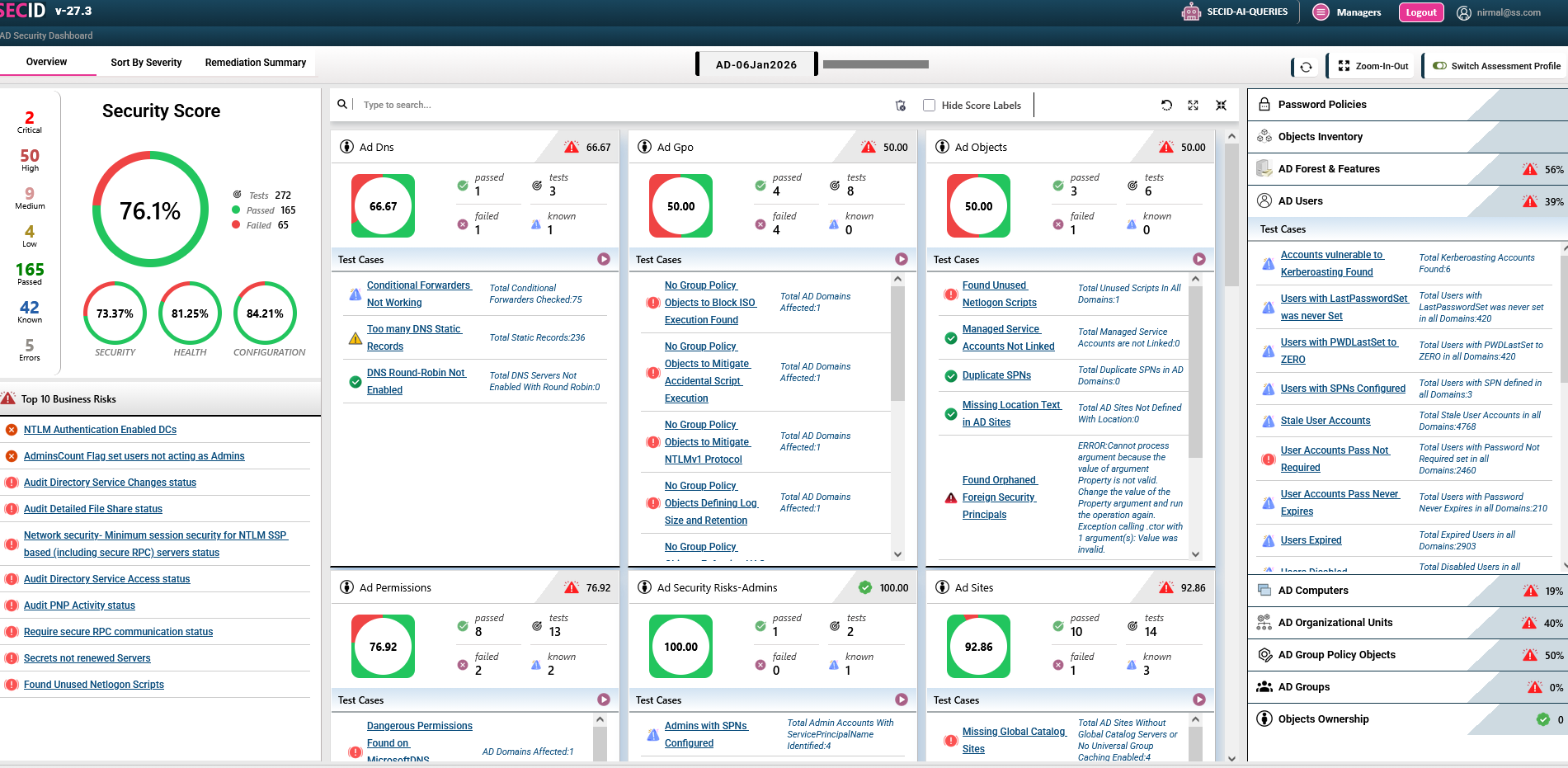
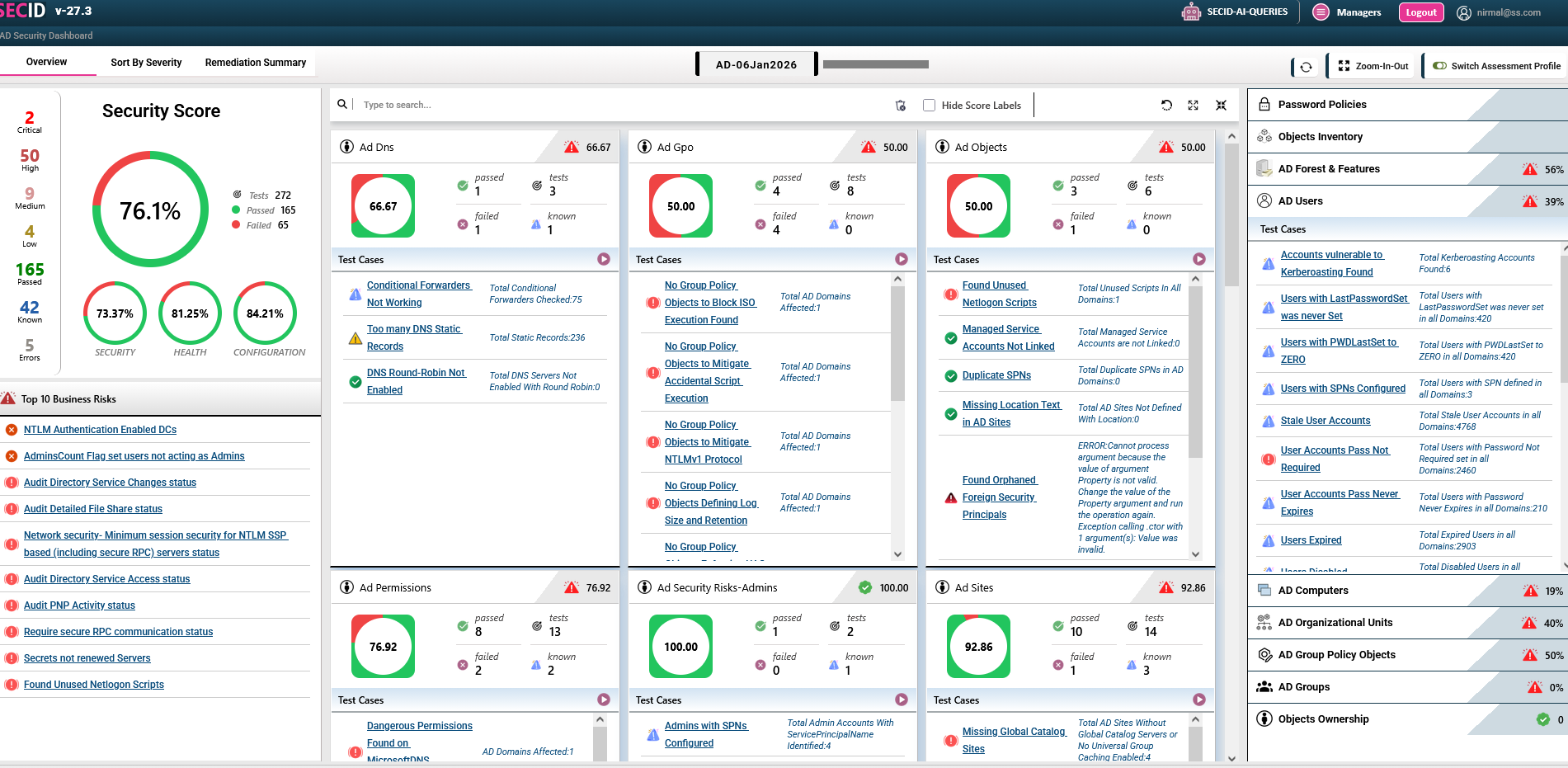
In SecID for Active Directory dashboard you can see all issues that have been identified during the assessment. All Critical, high, medium and low issues can be seen and their severity can be modified.

Security, Health & Configuration Score
SecID for Active Directory provides a comprehensive assessment of your AD environment by generating a detailed report for Security Score, health score, and configuration score. By combining these scores, SecID gives you a clear picture of your current security posture—highlighting strengths, identifying vulnerabilities, and offering actionable recommendations to improve overall AD security and resilience.

Collect Active Directory Inventory
Gathering a complete inventory of your Active Directory environment is a critical first step in any migration project. This includes details about users, groups, organizational units (OUs), computers, service accounts, trust relationships, and GPOs.
Why is this important? A detailed inventory helps identify outdated, unused, or misconfiguration objects that could complicate or delay the migration process. It also provides visibility into dependencies, security configurations, and potential conflicts. With a clear picture of your current AD environment, you can plan more effectively, reduce risk, and ensure a smoother, more efficient transition, whether you’re migrating to Entra ID or consolidating AD domains.

NIST/CIS Analyzer
Lorem ipsum is placeholder text commonly used in the graphic, print, and publishing industries for previewing layouts and visual mockups.

PDF, HTML and Excel Reports
SecID enables you to generate comprehensive security assessment reports in three convenient formats: PDF, HTML, and Excel. Choose the format that best suits your needs for management review, detailed analysis, compliance documentation, or remediation tracking.

WHY CHOOSE SECID for Active Directory
SecID supporting Assessment for 37 Technologies
SecID provides detailed findings, risk ratings, recommendations, remediation guidance, and actionable reports in PDF, HTML, and Excel formats, making it easier to understand risks and prioritize corrective actions. It helps organizations continuously assess their Active Directory environment, strengthen security controls, reduce attack surfaces, and maintain a stronger overall security posture.
No. SecID is a ready-only assessment. SecID Assessment collects data from target tenants and then analyze the data to prepare reports in Word, HTML, Excel and PowerPoint formats.
SecID provides a comprehensive assessment of Active Directory security with hundreds of security checks mapped to industry standards, security frameworks, and Microsoft-recommended settings. It helps organizations identify vulnerabilities, misconfigurations, excessive privileges, and security weaknesses across their AD environment.
SecID provides actionable recommendations for addressing identified security issues and helps organizations understand their overall Active Directory security posture. By regularly assessing AD and tracking security findings, organizations can reduce attack surfaces, strengthen security controls, and improve their overall security resilience.
250+
Projects Delivered
150+
Happy Clients
20+
Years & Industry Experience
98%
Client Satisfaction
LEARN
Learn Why Perform Health & Configuration Assessment as part of your Active Directory Security Assessment
If you have made the decision to conduct an Active Directory Security Assessment for your production AD Forests, it is crucial to recognize the potential security threats that may exist within your Active Directory environment. However, neglecting to address health and configuration issues poses a significant security risk. In this article, we will explore the importance of performing a “complete” Active Directory assessment, in addition to recommended security tests by organizations such as MITRE and ANSSI.
SECURITY SCORE
Active Directory Assessment: Known Your Current Security, Health and Configuration Score
SecID for Active Directory provides a comprehensive assessment of your AD environment by generating a detailed report that includes:
– Security Score – Evaluates how well your AD is protected against known attack vectors and misconfigurations.
– Health Score – Measures the stability and operational health of your AD infrastructure.
– Configuration Score – Assesses alignment with best practices and compliance standards like CIS, NIST, MITRE, and ANSSI.

AD MIGRATION
Known if you are Domain is ready for Migration
Is Your AD Domain Migration Ready?
Whether you’re migrating from Active Directory to Entra ID or from one AD domain to another, it’s critical to understand the potential object-level issues you’ll need to resolve. The AD Security Assessment by SecID provides a comprehensive AD Migration Score, helping you determine whether your domain is ready for migration or if remediation is needed beforehand.

AD INVENTORY
Collect Active Directory Inventory as part of AD Security Assessment
Gathering a complete inventory of your Active Directory environment is a critical first step in any migration project. This includes details about users, groups, organizational units (OUs), computers, service accounts, trust relationships, and GPOs.
Why is this important? A detailed inventory helps identify outdated, unused, or misconfigured objects that could complicate or delay the migration process. It also provides visibility into dependencies, security configurations, and potential conflicts. With a clear picture of your current AD environment, you can plan more effectively, reduce risk, and ensure a smoother, more efficient transition—whether you’re migrating to Entra ID or consolidating AD domains.

TEAM
Meet the experts behind every success.

Nirmal K Ratawa
Chief Technology Officer

Priyanka Sharma
CEO & President

Tim J
Head – Technical Services
Testimonials
Trusted by a community of 6,000+ users
Empowering startups, agencies, and technology companies with innovative digital solutions that drive growth, strengthen brands, and create lasting impact.

Outstanding service from start to finish. The team was professional, responsive, and delivered exactly what we needed. Highly recommended!

Daniel Wilson
Blogger
The entire process was smooth and impressive. The team understood our needs, delivered quality work, and provided excellent support too!!!

Sophia Williams
Blogger
Exceptional support and service from day one. The team was efficient, friendly, and created exactly what we needed with great care indeed!

James Carter
Project Manager
FAQ
Helpful answers before you get started
Find answers to the most common questions about SecID.
No. SecID connects to remote Systems using Dynamic Packs and collect required information. However, the Agent is required when monitoring Active Directory. For assessment for Active Directory, Microsoft 365, AVD and FSLogix the agent is not required.
No. SecID collects information in CSV files stored on SmartProfler computer. For Real-Time Agent Monitoring, SmartProfiler creates internal database.
CSV files only contain “Affected objects” data. For example, in the case of Microsoft 365 if a test
needs to check list of users or admins that do not have MFA enabled then CSV file will only contain
those affected users/admins. Similarly, if AD Assessment for SmartProfiler finds orphaned domain
controllers in Active Directory Forest then only orphaned domain controllers will be listed in CSV file.
Since PowerShell Modules used by SmartProfiler are designed by Microsoft and since all “Connect-xxxxx” commands perform a secure connection to Microsoft 365, Active Directory and Azure Virtual Desktop Tenants, the data collected from above targets is transferred securely to the SecID machine.
PS Remoting needs to be enabled on all Domain Controllers in order to run the Active Directory tests that belong to Domain Controllers. There are 60 tests that need to be executed to check security status of all domain controllers. These tests are checked to ensure Domain Controllers do not have any risks.
Blogs
Learn from experts, insights, and resources
Stay updated with the latest trends, tips, and resources for smarter website building.
-
Why AD Assessment
Why Perform an Active Directory Security Assessment? Active Directory (AD) remains one of the most critical identity and access management technologies in enterprise…